Generate UGC promo videos with OpenAI, Sora 2 and Blotato for eCommerce
💥 Generate UGC Promo Videos with Blotato and Sora 2 for eCommerce 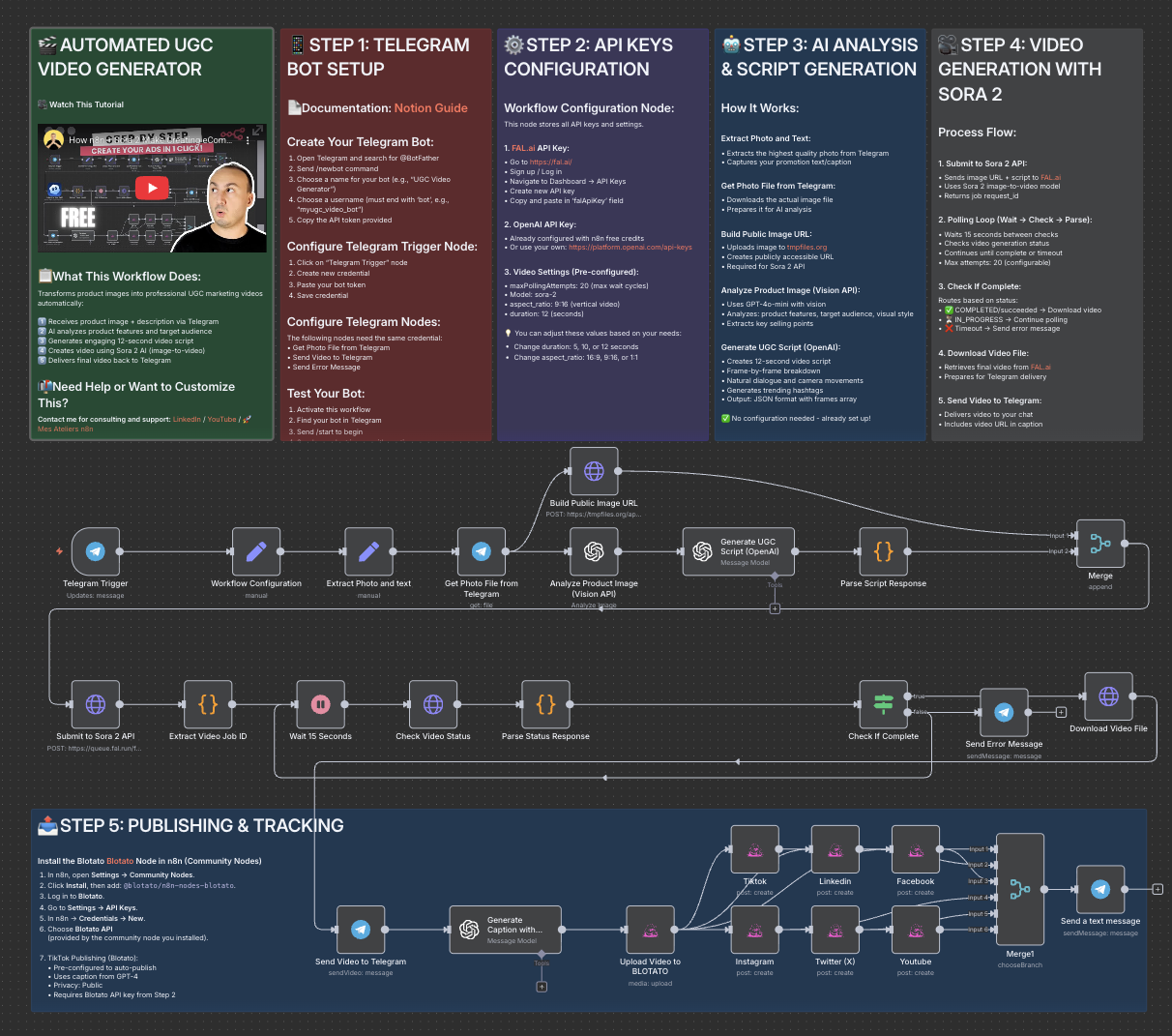 🧩 Who is this for? This workflow is perfect for eCommerce brands, content creators, and mar...
Template notes
💥 Generate UGC Promo Videos with Blotato and Sora 2 for eCommerce

🧩 Who is this for? This workflow is perfect for eCommerce brands, content creators, and marketing teams who want to automatically generate short, eye-catching videos from their product images — without editing software or manual work.
🚀 What problem does this workflow solve? Creating engaging promotional videos manually can be time-consuming and expensive. This automation eliminates that friction by combining Blotato, Sora 2, and AI scripting to turn static product images into dynamic UGC-style videos ready for TikTok, Instagram Reels, and YouTube Shorts.
⚙️ What this workflow does This workflow: 1. Receives a product image directly from Telegram or another input source. 2. Analyzes the image with OpenAI Vision to understand the product’s features and audience. 3. Generates a natural, short UGC-style script using GPT-based AI. 4. Sends the image and script to Sora 2 via the Fal API to generate a vertical promotional video. 5. Monitors the video status every 15 seconds until completion. 6. Downloads or automatically publishes the final video to your social platforms.
🧠 Setup 1. Create a Fal.ai API key and set it in your n8n credentials (Authorization: Key YOURFALKEY). 2. Connect your Telegram, OpenAI, and HTTP Request nodes as shown in the workflow. 3. Make sure the Build Public Image URL node outputs a valid, public image link. 4. In the HTTP Request node for Sora 2, set: - Method: POST - URL: https://fal.run/fal-ai/sora-2/image-to-video - Headers: - Authorization: Key YOURFALKEY - Content-Type: application/json - Body: Raw JSON with parameters like prompt, imageurl, duration, and aspectratio. 5. Run the workflow and monitor the execution logs for your video URL. 6. [Blotato](https://blotato.com/?ref=firas) → API key for social media publishing
🎨 How to customize this workflow to your needs - 🧾 Change the video tone: Edit the OpenAI prompt to produce educational, emotional, or luxury-style scripts. - 🎬 Adjust duration or format: Use Sora 2’s supported durations (4, 8, or 12 seconds) and aspect ratios (e.g., 9:16 for social media). - 📲 Auto-publish your videos: Connect the TikTok, Instagram, or YouTube upload nodes for full automation. - ✨ Add branding: Include overlays, logos, or end screens via CapCut or an external API integration.
🎥 [Watch This Tutorial](https://youtu.be/SZMWXW8Vk8E)