Generate AI viral videos with VEO 3 and upload to TikTok
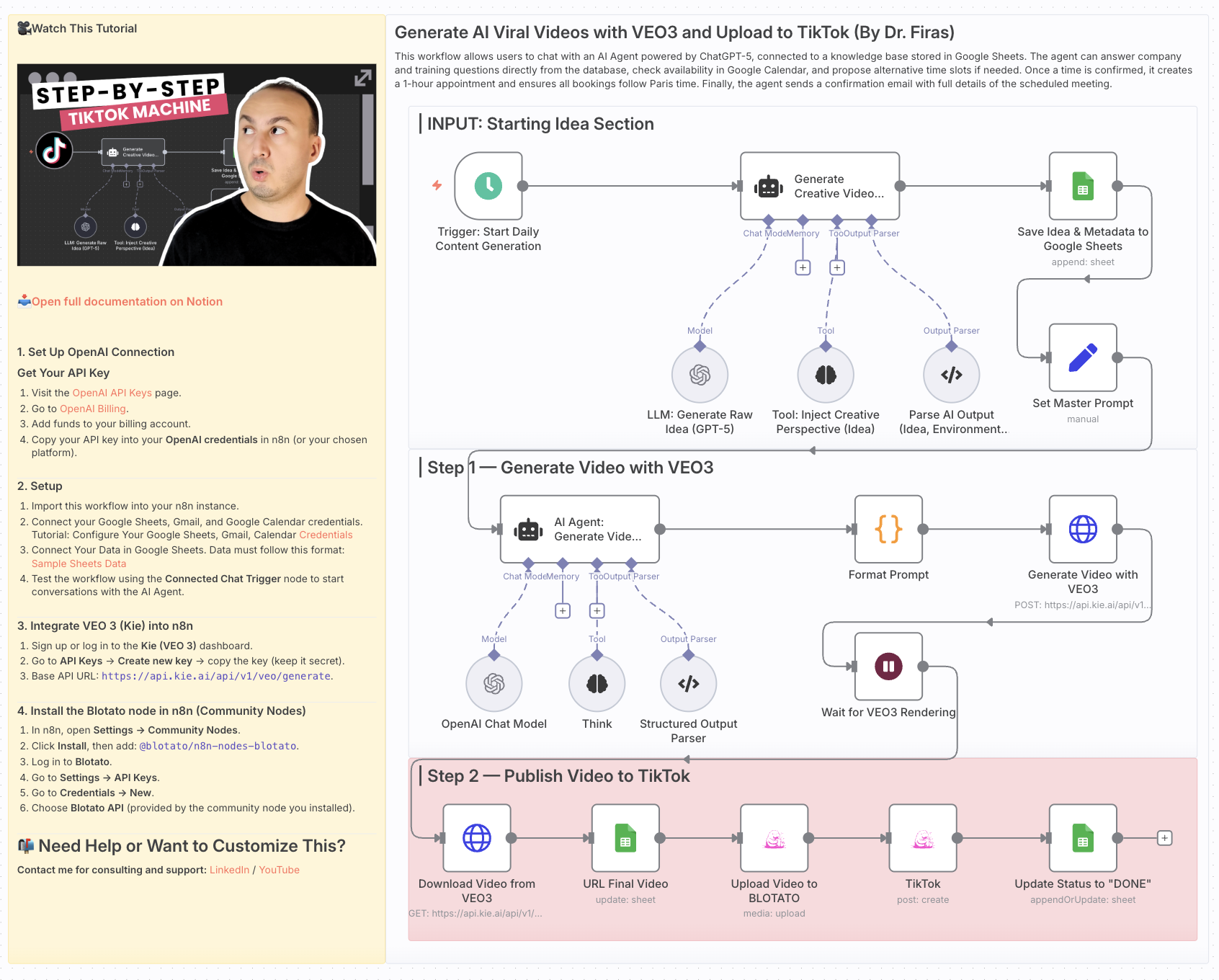 Generate AI Viral Videos with VEO3 and Auto-Publish to TikTok Who is this for? This workflow is for content creators, marketers, and social media manage...
Template notes

Generate AI Viral Videos with VEO3 and Auto-Publish to TikTok
Who is this for? This workflow is for content creators, marketers, and social media managers who want to consistently produce viral-style short videos and publish them automatically to TikTok — without manual editing or uploading.
What problem is this workflow solving? / Use case Creating short-form video content that stands out takes time: ideation, scriptwriting, video generation, and publishing. This workflow automates the entire pipeline — from idea generation to TikTok upload — enabling you to scale your content strategy and focus on creativity rather than repetitive tasks.
What this workflow does - Generates viral video ideas daily using GPT-5 - Creates structured prompts for before/after transformation videos - Renders cinematic vertical videos with VEO3 (9:16 format) - Saves ideas and metadata into Google Sheets for tracking - Uploads videos automatically to TikTok via Blotato integration - Updates status in Google Sheets once the video is live
The result: a fully automated daily viral video publishing system.
Setup 1. Google Sheets - Connect your Google Sheets account. - Create a sheet with columns for idea, caption, environment, sound, production, and finaloutput. 2. OpenAI - Add your OpenAI API credentials (for GPT-5 mini / GPT-4.1 mini). 3. VEO3 (Kie API) - Set up your API key in the HTTP Request node (Generate Video with VEO3). 4. Blotato - Connect your Blotato account for TikTok publishing. 5. Schedule Trigger - Adjust the Start Daily Content Generation node to fit your preferred posting frequency.
How to customize this workflow to your needs - Platforms: Extend publishing to YouTube Shorts or Instagram Reels by duplicating the TikTok step. - Frequency: Change the Schedule Trigger to post multiple times per day or only a few times per week. - Creative Style: Modify the system prompts to align with your brand’s style (cinematic, minimalist, neon, etc.). - Tracking: Enhance the Google Sheets logging with engagement metrics by pulling TikTok analytics via Blotato.