Find company LinkedIn URLs using Apify - Google Sheets integration
Find Company linkedin Urls directly in Google sheets This n8n template shows how to populate a Google Spreadsheet with LinkedIn company URLs automatically using the [Apify LinkedIn Company URL Finder actor](https://ap...
Template notes
Find Company linkedin Urls directly in Google sheets
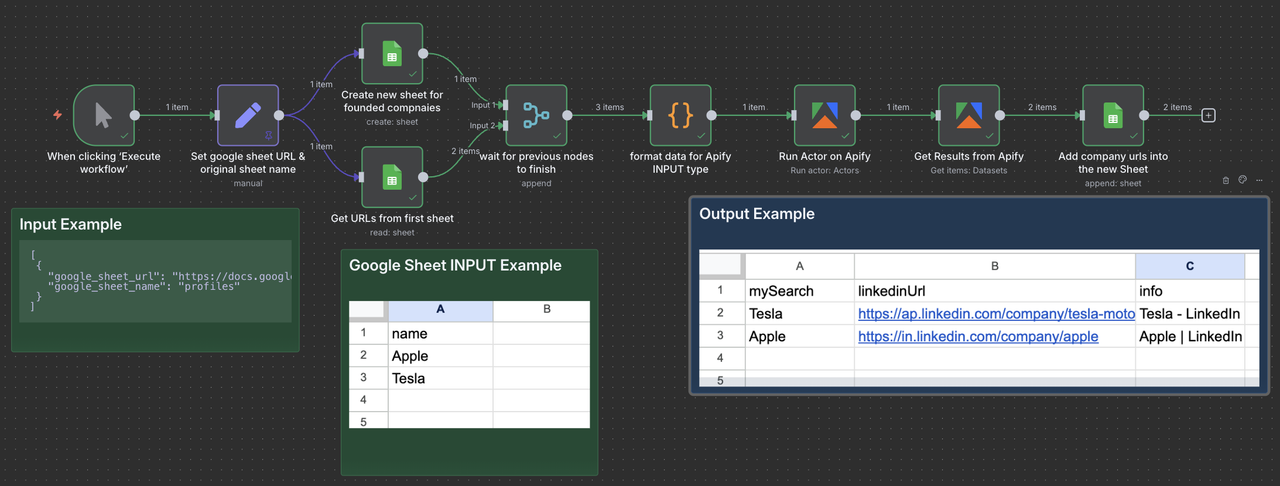
This n8n template shows how to populate a Google Spreadsheet with LinkedIn company URLs automatically using the [Apify LinkedIn Company URL Finder actor](https://apify.com/anchor/linkedin-company-url-finder) from [Anchor](https://apify.com/anchor). It will create a new sheet with the matched LinkedIn URLs.
You can use it to speed up lead research, keep CRM records consistent, or prep outreach lists — all directly inside n8n.
Who is this for - Sales Teams: Map accounts to their official LinkedIn pages fast. - Recruiters: Locate company pages before sourcing. - Growth Marketers: Clean and enrich account lists at scale. - Researchers: Track competitors and market segments. - CRM Builders: Normalize company records with an authoritative URL. - Lead-Gen Agencies: Deliver verified company URLs at volume.
How it works - Write a list of company names in Google Sheets (one per row) - The Apify node resolves each name to its LinkedIn company page - The results are then stored in a new Google Sheet
How to use
In Google Sheets: - Create a Google Sheet, rename the sheet companies, and add all the company names you want to resolve (one per row)