Extract emails, phones & social links from websites with Apify and Google Sheets
Try It Out! This n8n template shows how to, based on a list of website, enrich a Google Spreadsheet with emails and phone numbers automatically using the [Apify Email & Phone Extractor](https://apify.com/anchor/email-...
Template notes
Try It Out!
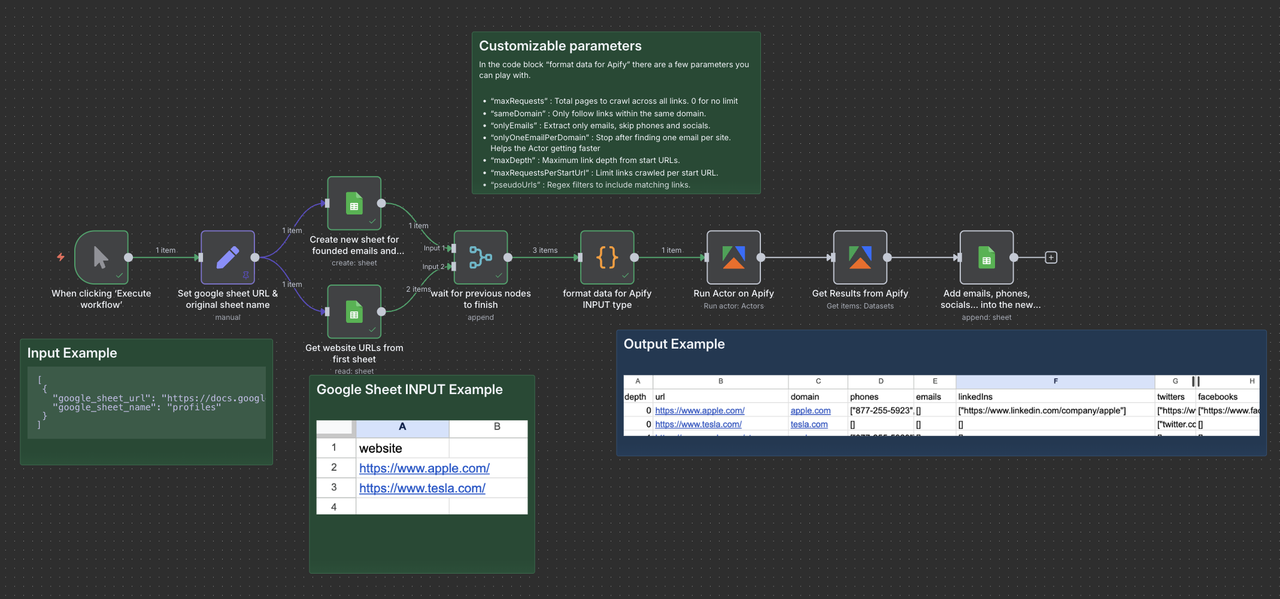
This n8n template shows how to, based on a list of website, enrich a Google Spreadsheet with emails and phone numbers automatically using the [Apify Email & Phone Extractor](https://apify.com/anchor/email-phone-extractor) actor from [Anchor](https://apify.com/anchor). It will create a new sheet with the extracted contact details.
You can use it to build lead enrichment workflows, keep CRM records current, or prep outreach lists, all directly inside n8n.
Who is this for - Sales Teams: Surface contacts for target accounts fast. - Recruiters: Find contact details on company sites. - Growth Marketers: Clean and enrich prospect lists at scale. - Researchers: Map industries and orgs with real contacts. - CRM Builders: Auto-populate contact fields from the web. - Lead-Gen Agencies: Deliver verified contact data at volume.
How it works - The workflow starts with a list of website URLs or domains in Google Sheets (one per row). - The Apify node runs the Email & Phone Extractor to collect emails, phone numbers, and social links (e.g., Twitter, LinkedIn, Instagram) from those sites. - The results are written to a new Google Sheet with the found contacts and their source pages.
How to use
In Google Sheets: - Create a Google Sheet, rename the sheet websites, and add all the domains or URLs you want to scan (one per row).