Enrich LinkedIn leads with Apify using Google Sheets
Enrich Profiles directly in Google Sheet ! This n8n template shows how to enrich Google spreadsheet with LinkedIn profiles automatically using the Apify LinkedIn Profile Enrichment actor from [Anchor](https://apify.co...
Template notes
Enrich Profiles directly in Google Sheet !
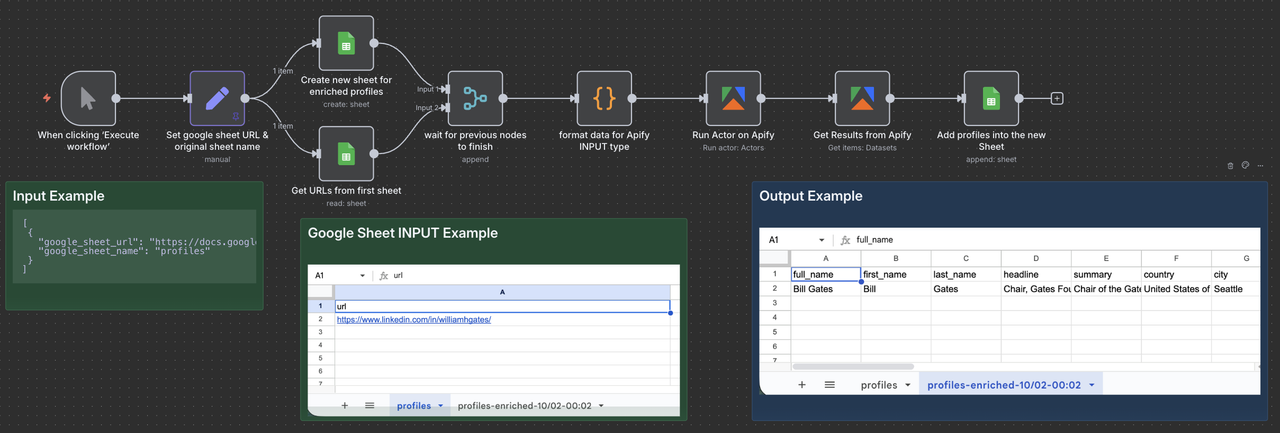
This n8n template shows how to enrich Google spreadsheet with LinkedIn profiles automatically using the Apify LinkedIn Profile Enrichment actor from [Anchor](https://apify.com/anchor). It will create a new sheet with the enriched data.
You can use it to build lead enrichment workflows, update your CRM records, or personalize outreach campaigns — all directly inside n8n.
Who is this for - Sales Teams: Build targeted B2B lead lists fast. - Recruiters: Gather candidate data from LinkedIn profiles. - Growth Marketers: Enrich outreach lists with LinkedIn info. - Researchers: Analyze industries, roles, and company trends. - CRM Builders: Auto-populate contact data from LinkedIn. - Lead-Gen Agencies: Deliver qualified prospect lists at scale.
How it works - The workflow starts with a list of LinkedIn profile URLs (you need to set the Google sheet URL after you added the Google credentials from the n8n settings). - The Apify node runs the LinkedIn Profile Enrichment actor to extract structured data such as name, title, company, location, and more. - The results are then stored in a new Google Sheet
How to use In Google Sheet: - Create a Google sheet, rename the sheet "profiles" and add all the LinkedIn URLs you want to enrich (one url per row)
In this Workflow: - Open the "Set google sheet URL & orginial sheet name" and replace the example Google sheet URL, and the name of the sheet where your LinkedIn URLs are