Enrich lead profiles from LinkedIn URLs with Apify and Google Sheets
Transform LinkedIn profile URLs into comprehensive enriched lead profiles, quickly and automatically. Add URLs to your sheet, run the workflow, and get fully enriched contact data: names, job titles, company details, ...
Template notes
Transform LinkedIn profile URLs into comprehensive enriched lead profiles, quickly and automatically.
Add URLs to your sheet, run the workflow, and get fully enriched contact data: names, job titles, company details, career history, recent activity, and more – all written back to your spreadsheet.
What it does - Reads unenriched rows from Google Sheets (detects empty "First Name" field) - Scrapes LinkedIn profiles via Apify (devfusion~linkedin-profile-scraper actor) - Polls for completion with smart retry logic (15-second intervals, max 20 attempts) - Extracts comprehensive profile data: - Personal info (name, location, headline, bio) - Current role (title, description, company, industry, size, website) - Additional concurrent positions (for people with multiple roles) - Most recent previous employer - Last 2 LinkedIn posts with links - Writes enriched data back to the same Google Sheet row - Handles errors gracefully with status updates
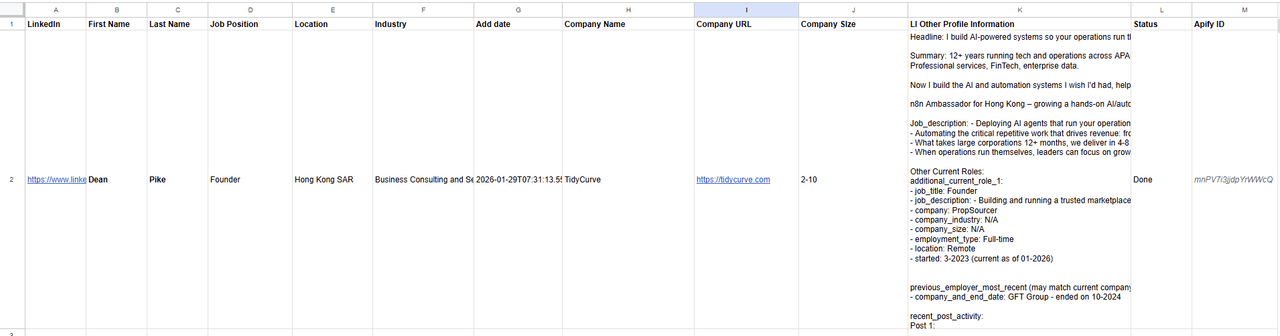
Requirements - Apify account + API token - Google Sheets OAuth2 credentials - A Google Sheet with columns: LinkedIn, First Name, Last Name, Job Position, Location, Industry, Company Name, Company URL, Company Size, LI Other Profile Information, Status, Apify ID, Add date, rownumber
Setup 1. Create your Google Sheet with the required columns (or duplicate the template structure) 2. Replace YOURAPIFYAPIKEY in three HTTP Request nodes: "Start Apify Scrape", "Check Status", and "Fetch LinkedIn Data" 3. Connect your Google Sheets OAuth2 credentials to the two Google Sheets nodes 4. Update the document ID if using your own sheet (currently points to a specific sheet) 5. Add LinkedIn profile URLs to the "LinkedIn" column, leaving "First Name" blank 6. Run manually – workflow processes all unenriched rows sequentially
Sample Output
Google Sheet row output - from one successfully enriched lead profile via LinkedIn URL: [Link to Google Sheets sample file](https://docs.google.com/spreadsheets/d/1kLOvqW5U62IinkTCB6R8zVXHdlMayTz4werxnxXtU/edit?usp=sharing)