AI virtual TryOn automated generation 🤖🧠 for WooCommerce clothing catalog 👔
This AI Agent is designed to streamline the process of creating realistic images of clothing products worn by models, eliminating the need for expensive photoshoots. The primary goal is to automate the generation of v...
Template notes
This AI Agent is designed to streamline the process of creating realistic images of clothing products worn by models, eliminating the need for expensive photoshoots. The primary goal is to automate the generation of virtual try-on images for an eCommerce store selling clothing, using advanced image processing technologies.
[Example of results](https://docs.google.com/spreadsheets/d/11ebWJvwwXHgvQld9kxywKQUvIoBw6xMa0g0BuIqHDxE/edit?usp=sharing)
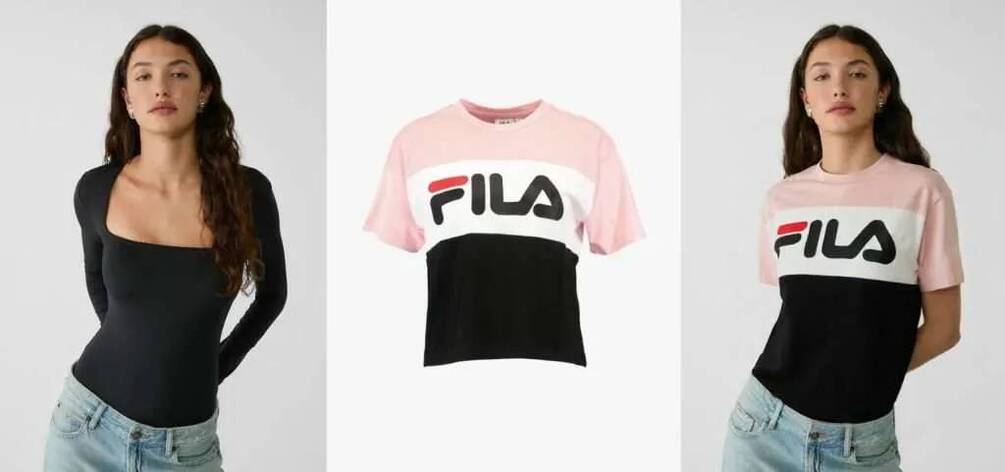
How It Works 1. Triggering the Workflow: - The workflow can be triggered manually using the When clicking ‘Test workflow’ node or automatically via the Schedule Trigger node, which runs the workflow at regular intervals (e.g., every 5 minutes).
2. Data Retrieval: - The Get new product node retrieves data from a Google Sheets document containing the URLs of the model image, the clothing product image, and the WooCommerce product ID. The document also includes a column for the resulting virtual try-on image URL, which is initially empty.
3. Setting Up the Request: - The Set data node prepares the data for the AI request by assigning the model image URL and the product image URL to variables.
4. AI Image Generation: - The Create Image node sends a request to API to generate a virtual try-on image. The request includes the URLs of the model and the clothing product. When you register for the API service you will get 1$ for free. For continuous work add API credits to your account.
5. Image Retrieval: - The Get Url image node retrieves the URL of the generated virtual try-on image. - The Get File image node downloads the generated image from the provided URL.