Activate and deactivate workflows on schedule using native n8n API
How it works This workflow will activate and deactivate a selected other workflow on schedule. > ⚠️ Warning! > This approach won't work for trial users as it requires n8n API that is not available to trial users...
Template notes
How it works This workflow will activate and deactivate a selected other workflow on schedule.
> ⚠️ Warning! > This approach won't work for trial users as it requires n8n API that is not available to trial users. > See [https://docs.n8n.io/api/](https://docs.n8n.io/api/) for details.
Set up steps 1. Adjust activation/deactivation schedule per your needs. [Custom (cron) interval](https://docs.n8n.io/integrations/builtin/core-nodes/n8n-nodes-base.scheduletrigger/custom-cron-interval) is a recommended approach. 2. Set targeted Workflow ID. You will find it in the URL of the workflow you want to manage. 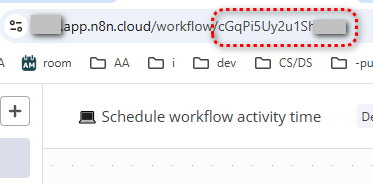 3. Set n8n API credentials: - Create an API key: [how to](https://docs.n8n.io/api/authentication/) - Create n8n credentials using the API key: [how to](https://docs.n8n.io/credentials/add-edit-credentials/create-a-credential)
This workflow uses [n8n node](https://docs.n8n.io/integrations/builtin/core-nodes/n8n-nodes-base.n8n/).
DevOps workflow-management
---
Other useful stuff
Need a universal Error workflow to catch both execution and trigger errors? Here you go: [Error handling: Send email via Gmail on execution or trigger-level errors](https://n8n.io/workflows/3075-error-handling-send-email-via-gmail-on-execution-or-trigger-level-errors/)